1
Main subject
Have ready
Name the person, product, place, or idea that must remain central.
Helpful context
Add distinctive visual traits such as color, shape, clothing, or setting.
Video tutorial
This guide shows how to use hypernatural ai video from the first idea to a more polished draft. You will learn what to prepare, which choices matter most, and how to diagnose results that miss the brief.
A strong first attempt depends less on elaborate wording than on having a clear subject, audience, format, and desired action. Prepare the essentials first, then add detail only where it supports the result.
Have ready
Name the person, product, place, or idea that must remain central.
Helpful context
Add distinctive visual traits such as color, shape, clothing, or setting.
Have ready
State who should understand or care about the video.
Helpful context
Mention whether the tone should feel playful, polished, instructional, or dramatic.
Have ready
Define one outcome, such as explaining, promoting, inviting, or entertaining.
Helpful context
Include the action viewers should take after watching.
Have ready
Choose the intended orientation and channel before refining the scene.
Helpful context
Keep key text and faces away from edges where possible.
Have ready
Describe one primary movement, such as a pan, reveal, walk, or gentle zoom.
Helpful context
Add a second movement only if it helps the story rather than adding noise.
Have ready
Decide what must be correct on the first review: subject, message, mood, or timing.
Helpful context
Keep a short checklist so revisions stay focused.
Work in short passes. First establish the idea, then inspect the generated video, and finally revise one variable at a time so you can tell what improved the result.
Start with the subject, setting, action, mood, and intended audience. A concrete brief is easier to assess than a collection of disconnected adjectives. If the video is promotional, describe the product benefit as well as its appearance.
Read the result as a viewer, not as the author. Check whether the main subject stays recognizable, whether the action is understandable, and whether the visual tone matches the purpose. Note the single largest problem before changing anything.
Rewrite the prompt around the problem you found. You might simplify the action, clarify the camera movement, change the setting, or make the subject more specific. Generate another draft and compare it with the previous version.
The difference between a rough concept and a usable draft often comes from editing the brief, not from adding more words. Use comparison to make each revision deliberate.

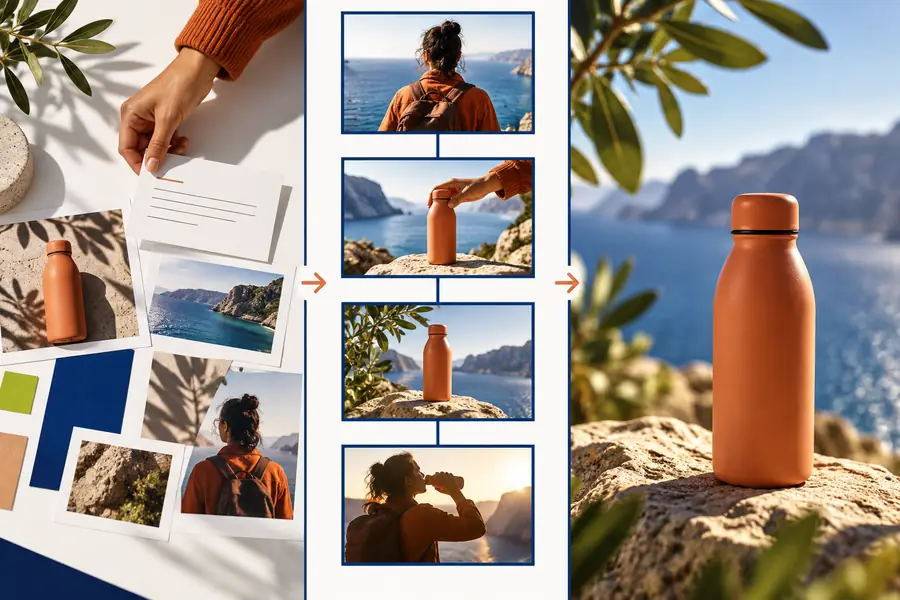
The strongest revisions clarify one visual decision at a time: subject priority, camera movement, lighting, or message. If every sentence changes at once, it becomes difficult to know which instruction helped. Keep the useful parts of the first brief, remove conflicting adjectives, and make the opening moment specific enough that a viewer can understand it quickly.
Most disappointing drafts are not failures of imagination. They are usually caused by an overloaded brief, an unclear subject, or a mismatch between the intended message and the visual instructions.
If the prompt only says to make something exciting, the result has no clear creative target. The system may choose a subject, setting, and action that do not fit your purpose.
WorkaroundWrite one sentence explaining what the viewer should see and one sentence explaining why it matters.
Tiny logos, exact lettering, complex patterns, and subtle product features can become inconsistent during generation or revision.
WorkaroundPrioritize the most important visual identity cues and keep supporting details simple. Add exact copy during a later editing stage when needed.
A scene that asks for several subjects, camera moves, transitions, and emotional beats may feel crowded or difficult to follow.
WorkaroundChoose one primary action and one supporting movement. Split a complicated idea into separate shots or drafts.
A visually attractive frame can still lack a readable beginning, middle, or ending. Static beauty does not guarantee clear communication.
WorkaroundDescribe the change that should happen during the clip, then review whether the first and last moments support that change.
You now have a repeatable process: define the subject, describe the scene, inspect the first result, and make a focused revision. Open the workspace when you are ready to test a prompt and judge the output against your own brief.
These answers cover the practical questions people ask when learning how to use hypernatural ai video for a first draft or a focused revision.
Begin with a short scene brief that names the subject, setting, action, mood, and purpose. Generate an initial draft, inspect it against that brief, and revise the most important mismatch rather than changing every instruction at once.
Include the main subject, what it is doing, where the scene takes place, the visual tone, and any important camera movement. If the video supports a campaign or explanation, also state the audience and the message the viewer should remember.
Add a clear change across the clip, such as a reveal, demonstration, transformation, arrival, or response. Then make the opening state and ending state explicit so the viewer can understand what happened.
A prompt can become difficult to follow when it contains too many subjects, actions, styles, and exceptions. Simplify the brief, protect the two or three details that matter most, and test a new version with one focused change.
There is no fixed number because the right stopping point depends on the purpose and the size of the problem. Make a few focused revisions when the concept is sound; change the idea when the subject, action, or message remains unclear after simplification.